Create Lambda Function #1
Overview
In this step, you will create the first Lambda Function named UploadInvoiceFileFunction. This function is triggered when a user uploads an invoice file to the S3 bucket. It then uses Amazon Textract to extract text, Amazon Bedrock to analyze and understand the content, and finally stores the extracted information into DynamoDB.
Step 1: Open the Lambda Console
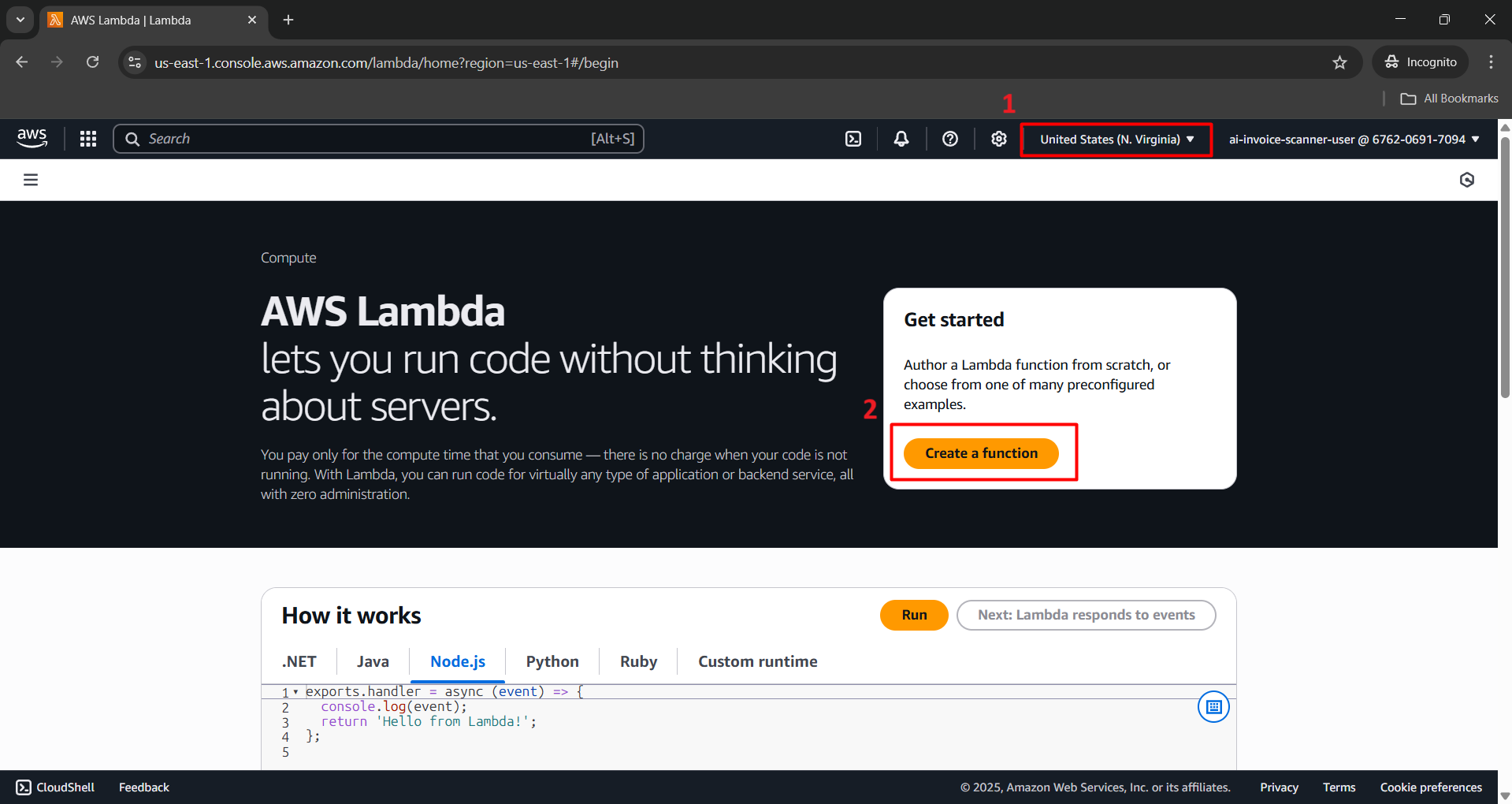
- Log in to the AWS Console, search for Lambda, and select Lambda.

⚠️ Note: Make sure you are in the correct Region: N. Virginia (us-east-1) before creating the Lambda function. This is the region where you created the S3 bucket, DynamoDB table, and registered Amazon Bedrock. If you choose the wrong region, Lambda won’t be able to access the system’s other services.
- Click Create function.
Step 2: Configure the Lambda Function
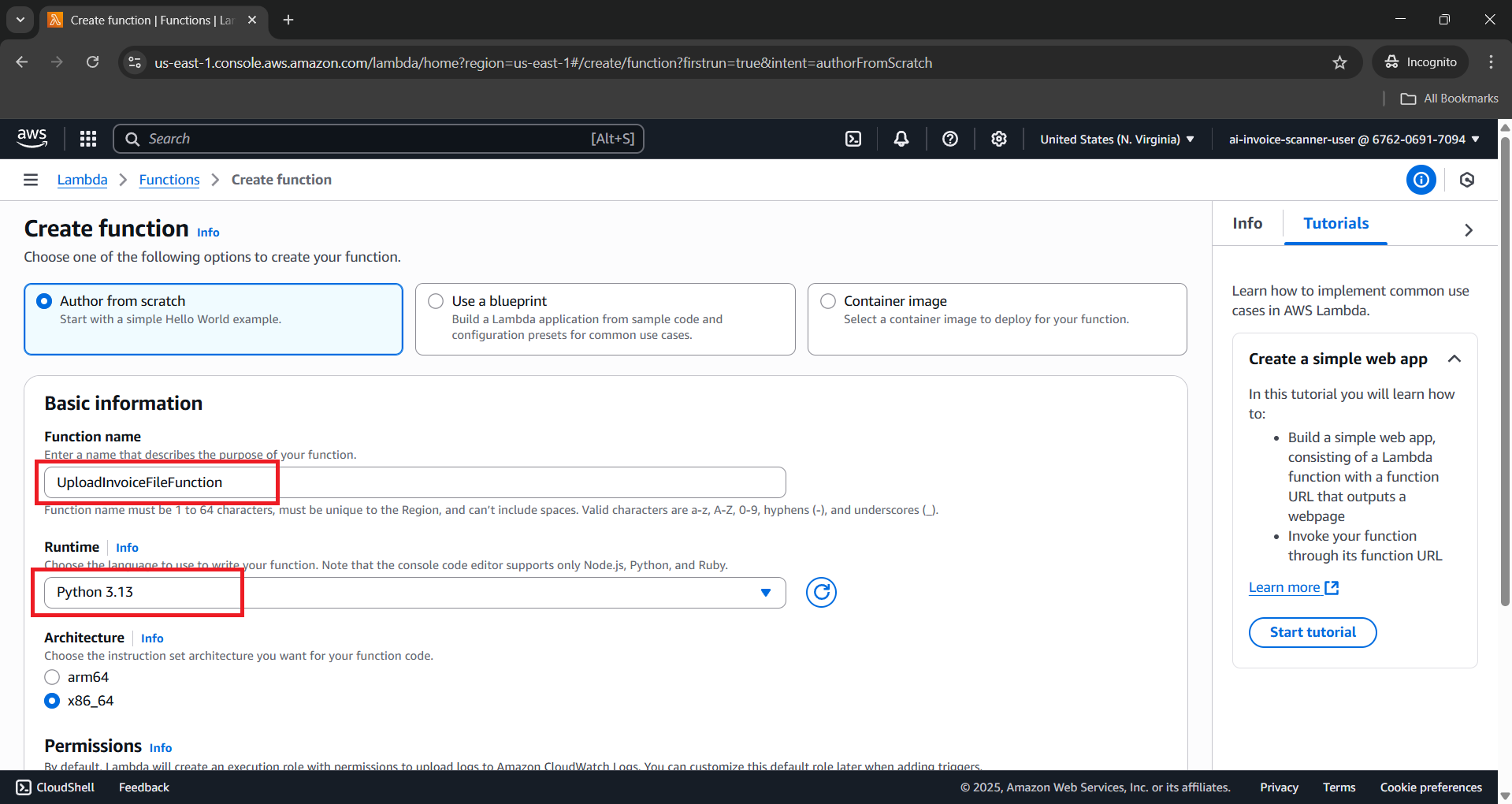
Under Author from scratch, fill in the following details:
- Function name:
UploadInvoiceFileFunction - Runtime:
Python 3.12 - Architecture:
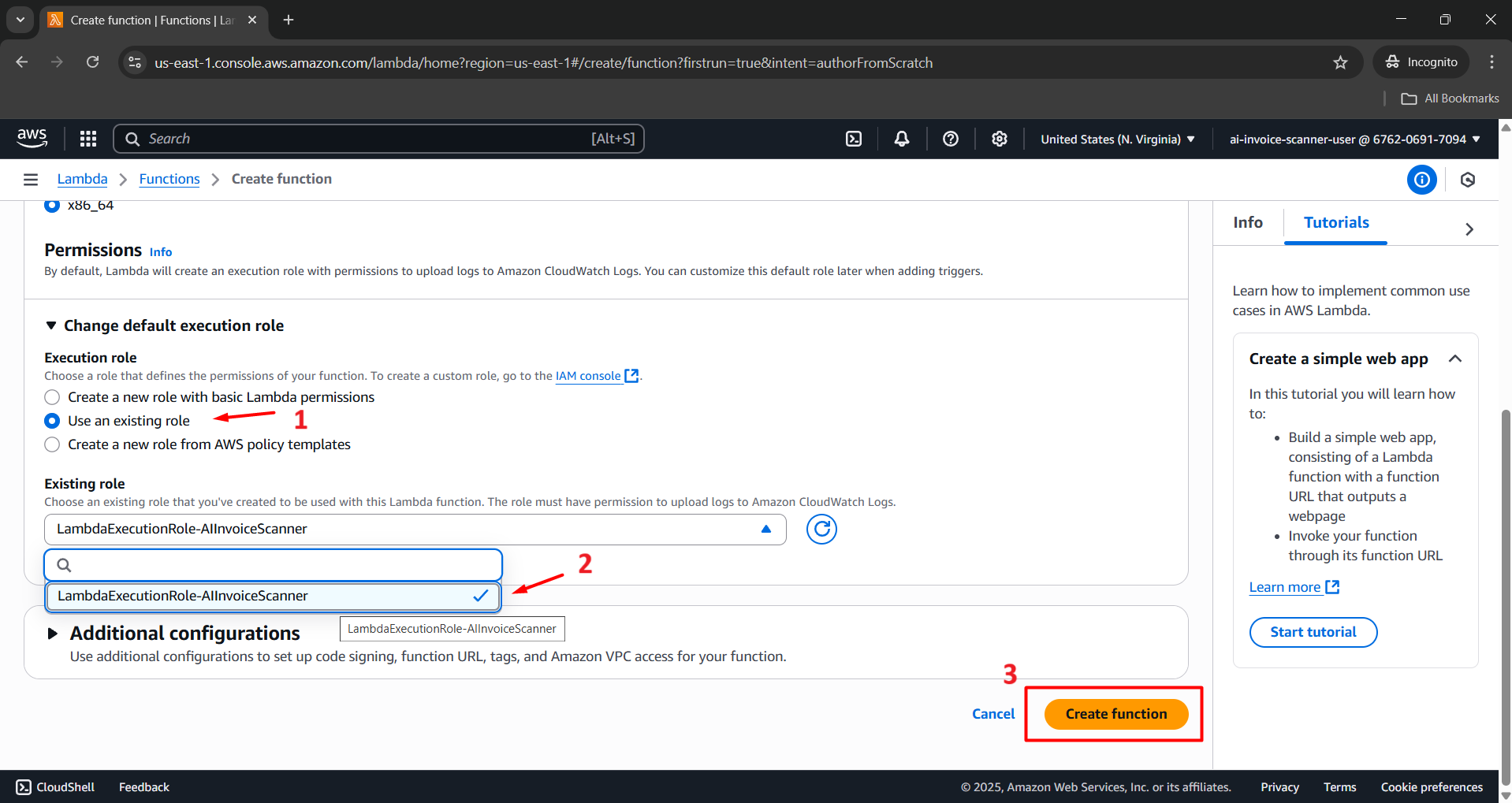
x86_64 - Permissions: Choose Use an existing role
- Existing role:
LambdaExecutionRole-AIInvoiceScanner(created in the previous step)
- Function name:
- Click Create function to proceed.
Step 3: Add Python Code
Once the function is created, scroll down to the Code section in the Lambda interface.
Paste the entire Python code below, replacing the default content:
import boto3
import json
import uuid
import base64
import re
import time
from decimal import Decimal

# AWS clients
s3 = boto3.client('s3')
textract = boto3.client('textract')
dynamodb = boto3.resource('dynamodb')
bedrock = boto3.client('bedrock-runtime', region_name='us-east-1')

# Constants
BUCKET_NAME = 'invoice-upload-s3-bucket'
table = dynamodb.Table('InvoiceData')

def decimal_default(obj):
    if isinstance(obj, Decimal):
        return float(round(obj, 2))

def make_response(status_code, body_dict):
    return {
        'statusCode': status_code,
        'headers': {
            'Access-Control-Allow-Origin': '*',
            'Access-Control-Allow-Credentials': True,
            'Access-Control-Allow-Headers': '*',
            'Access-Control-Allow-Methods': 'OPTIONS,POST'
        },
        'body': json.dumps(body_dict, default=decimal_default)
    }

def lambda_handler(event, context):
    print("🔍 Incoming event:")
    print(json.dumps(event))

    try:
        # === CASE 1: API Gateway POST upload file ===
        if "body" in event and isinstance(event['body'], str) and not ("Records" in event):
            body = json.loads(event['body'])
            file_data = base64.b64decode(body['file'])
            filename = body.get('filename', f'invoice_{uuid.uuid4()}.png')
            key = f'uploads/{filename}'

            s3.put_object(
                Bucket=BUCKET_NAME,
                Key=key,
                Body=file_data,
                ContentType='image/png'
            )

            print(f"✅ Uploaded '{key}'")
            return make_response(200, {
                'message': 'Upload thành công',
                's3_path': f's3://{BUCKET_NAME}/{key}'
            })

        # === CASE 2: S3 Trigger xử lý hóa đơn ===
        elif "Records" in event and "s3" in event["Records"][0]:
            bucket = event['Records'][0]['s3']['bucket']['name']
            key = event['Records'][0]['s3']['object']['key']
            print(f"📥 Trigger từ S3: bucket={bucket}, key={key}")

            # 1. Textract
            textract_response = textract.detect_document_text(
                Document={'S3Object': {'Bucket': bucket, 'Name': key}}
            )
            extracted_text = ' '.join(
                [block['Text'] for block in textract_response['Blocks'] if block['BlockType'] == 'LINE']
            )

            if len(extracted_text.strip()) < 20:
                return make_response(400, {'error': 'Không phát hiện được nội dung hợp lệ từ ảnh.'})

            # 2. Prompt cho Bedrock
            prompt = (
                "You are a precise invoice data parser. Extract structured data from the invoice text below.\n"
                "Return ONLY valid JSON with fields:\n"
                "{\n"
                "  \"InvoiceId\": \"\",\n"
                "  \"CustomerName\": \"\",\n"
                "  \"InvoiceDate\": \"\",\n"
                "  \"DueDate\": \"\",\n"
                "  \"PurchaseOrderNumber\": \"\",\n"
                "  \"Company\": {\"Name\": \"\", \"Address\": \"\"},\n"
                "  \"BillTo\": {\"Name\": \"\", \"Address\": \"\"},\n"
                "  \"ShipTo\": {\"Name\": \"\", \"Address\": \"\"},\n"
                "  \"Items\": [\n"
                "    {\"Description\": \"\", \"Quantity\": 0, \"UnitPrice\": 0.0, \"Amount\": 0.0}\n"
                "  ],\n"
                "  \"Subtotal\": 0.0,\n"
                "  \"Tax\": {\"Rate\": 0.0, \"Amount\": 0.0},\n"
                "  \"TotalAmount\": 0.0,\n"
                "  \"Currency\": \"\",\n"
                "  \"PaymentTerms\": {\"DueWithinDays\": 0, \"PayableTo\": \"\"}\n"
                "}\n"
                "Rules:\n"
                "- Normalize all dates to ISO format YYYY-MM-DD.\n"
                "- If the text uses DD/MM/YYYY, convert to YYYY-MM-DD correctly.\n"
                "- Ensure numeric values are floats.\n"
                "- If a value is missing, set it to null.\n"
                "- No explanation, no markdown, no extra text.\n\n"
                f"Invoice text:\n{extracted_text}"
            )

            messages = [{"role": "user", "content": [{"text": prompt}]}]

            response = bedrock.converse(
                modelId="amazon.nova-pro-v1:0",
                messages=messages,
                inferenceConfig={"maxTokens": 1024, "temperature": 0.2, "topP": 0.9}
            )
            ai_text = response['output']['message']['content'][0]['text']
            print("🧠 Bedrock raw output:", ai_text)

            # 3. Parse JSON output
            try:
                match = re.search(r'({.*})', ai_text, re.DOTALL | re.MULTILINE)
                json_str = match.group(1) if match else ai_text.strip()
                result_json = json.loads(json_str, parse_float=Decimal)
            except Exception as e:
                print("❌ Lỗi parse JSON:", str(e))
                result_json = {"error": "Invalid JSON", "raw_output": ai_text}

            # 4. Lưu vào DynamoDB (thêm trường Tags rỗng)
            result_json['S3Object'] = f's3://{bucket}/{key}'
            if 'Tags' not in result_json:
                result_json['Tags'] = []

            table.put_item(Item=result_json)

            print("✅ Lưu vào DynamoDB thành công.")
            return make_response(200, {'message': 'Xử lý thành công', 'parsed': result_json})

        else:
            return make_response(400, {'error': 'Request không hợp lệ.'})

    except Exception as e:
        print("❌ Lỗi tổng quát:", str(e))
        return make_response(500, {'error': str(e)})

- Click Deploy to apply the changes.

Step 4: Configure Timeout and Memory
- Go to the Configuration > General configuration tab.
- Click Edit.

Change the following values:
- Memory (MB):
1024 - Timeout:
1 minute
- Memory (MB):

- Click Save.

Conclusion
You have successfully created the first Lambda Function in the system: UploadInvoiceFileFunction.
- This function is automatically triggered whenever a user uploads an invoice to the uploads/ folder in S3.
- It uses Amazon Textract to extract text from the invoice.
- Then uses Amazon Bedrock Nova Pro to analyze the content.
- Finally, the data is stored in DynamoDB for querying and display purposes.